
You pick the direction.
SquidTrade handles the trades.
Simple enough for new traders, fast enough for experienced ones. Three lights show you the trend. You press BUY or SELL and ACTIVE; SquidTrade opens the trade, adds to it on small pullbacks, takes profit, and sets a stop if the move goes too far.
- No VPS needed · runs in your own MT5
- Live · you see every trade as it happens
- You decide · ACTIVE, side and close are one click
Built for XAUUSD (gold) on MT5. A trade-management tool, not a signal service.
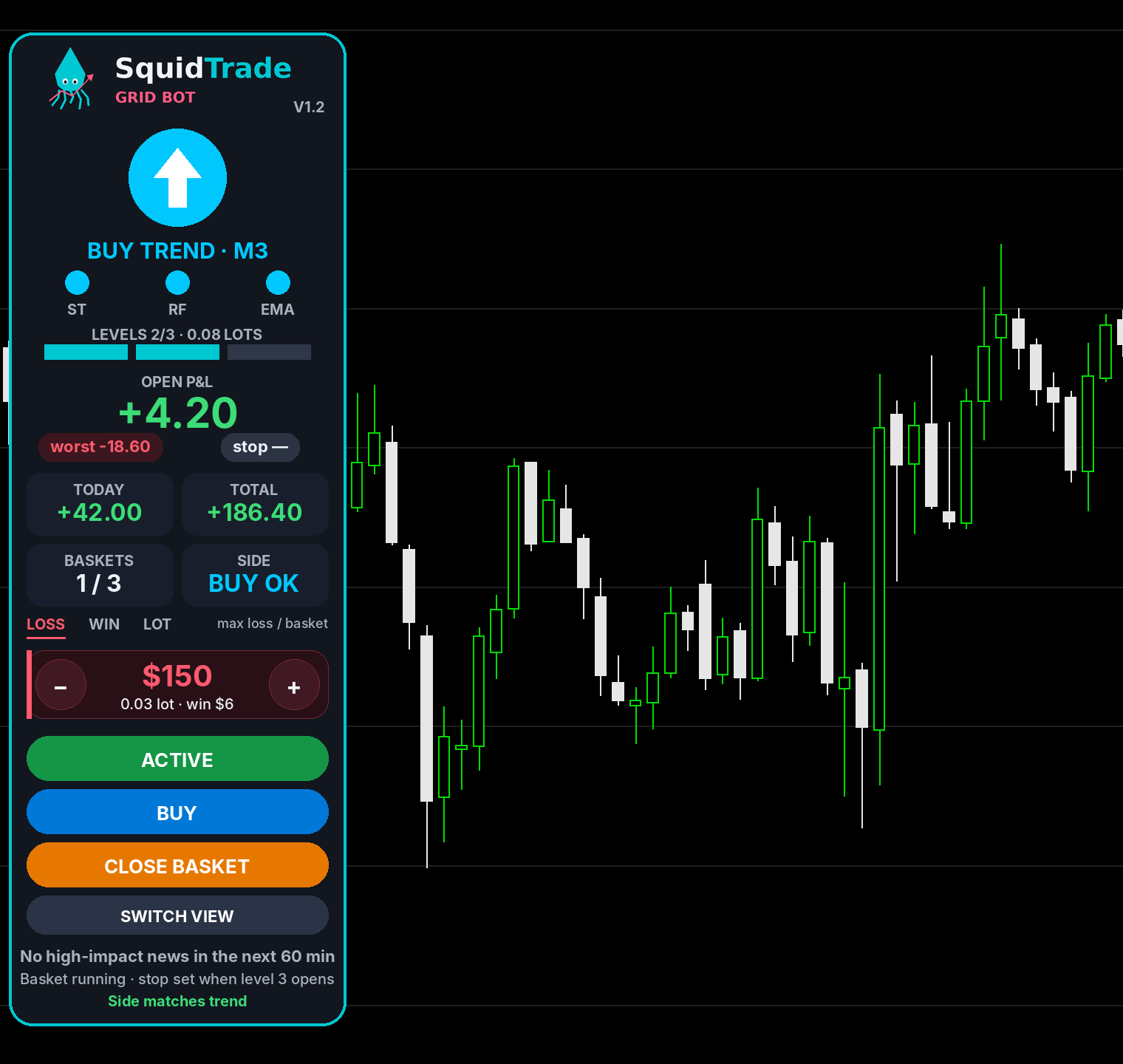
See it in action
About a minute, start to finish: check the trend lights, pick a side, press ACTIVE, and watch SquidTrade add levels on pullbacks, close each basket together, place its automatic stop, pause after three baskets, and switch to the top-strip view. The video replays the bot's rules on real gold prices from 17 November 2026.
Simulation on historical prices. Past results do not guarantee future results.
How it works
SquidTrade never chooses the direction for you. You bring the market read; it brings consistent execution and hard limits.
Read the trend
Use your own analysis, or the built-in panel: Supertrend, Range Filter and EMA 50/200 on the 3-minute chart, with an up or down arrow when all three agree.
Choose a side and press ACTIVE
SquidTrade opens level 1, adds larger trades at set distances if price pulls back, and closes all of them together just past their average price.
It pauses and asks you
After 3 baskets (you choose the number) it switches itself off and asks you to re-check the market, so it never trades a trend that has already turned.
Right direction, but stopped out anyway?
Most traders don't quit because they read the market wrong. They quit because of how they lost. Sound familiar?
- ✕You were right, and still lost.You called gold up, a $5 dip hit your stop, and then it rallied without you.
- ✕One trade undid a week of work.You moved your stop "just this once", and a single loss wiped out every win.
- ✕You're close to giving up.You lost hundreds, maybe thousands, in your first months and you're asking yourself if trading is for you.
You buy at 3700 with a $5 stop. Price dips to 3693 first, so you’re stopped out, then it climbs to 3712. You were right and still lost.
Same move. The dip triggers level 2 (0.05 lot) at 3694.6, which lowers the average price. When price comes back to 3697.6, both trades close together in profit.
If gold keeps falling, levels 2 and 3 open and the automatic stop closes everything where a 4th level would be. The loss is capped and known in advance.
See exactly what you get
Every feature below is a real part of the SquidTrade panel in MT5. Your broker, your money, your control.
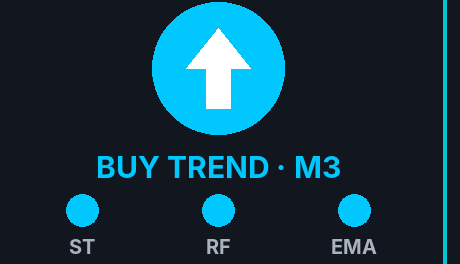
Trend at a glance
Supertrend, Range Filter and EMA 50/200 on the 3-minute chart. All blue = up, all red = down.
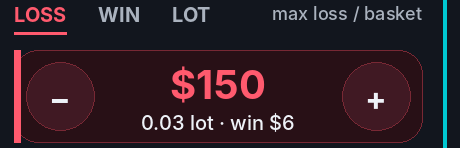
Risk in dollars
Type how much one basket may lose (or win). The bot picks the lot sizes and shows them.
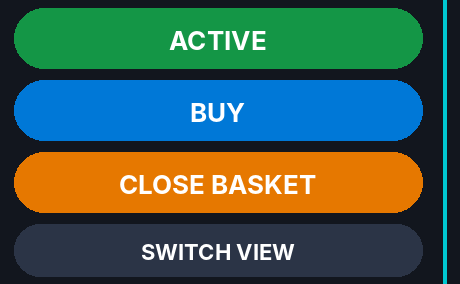
One-click control
ACTIVE, BUY / SELL and CLOSE BASKET right on the chart.

Up to 3 levels
Adds bigger trades on pullbacks and closes them together just past their average.
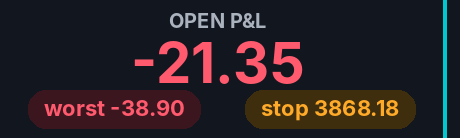
Automatic stop
When the last level opens, a stop goes on the broker’s server, even if MT5 closes.
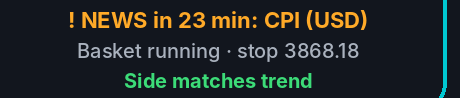
News alerts
Warns an hour before high-impact USD news, on screen and on your phone.
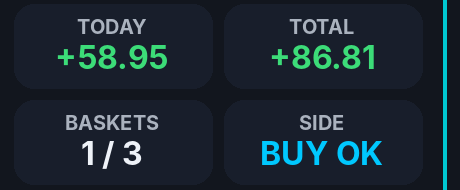
Profit tracking
Open P&L, worst point, today’s and total profit, plus a log of every action.
Pauses itself
After 3 baskets it switches off and asks you to check the trend again.

Two panel views
A column, or this strip across the top with one click. Adapts from big monitors to tiled charts.
Inside the panel
The panel as it looks in MT5. Click any picture to enlarge it.
Who uses SquidTrade
Anyone who has a view on where gold is going, or wants three lights to help them form one. No coding needed.
New traders
No charts full of lines. Three lights show the trend in plain colours, and the panel says what the bot is doing.
- ✓Blue = up, red = down, grey = wait
- ✓7-day free trial on demo
Live-stream watchers
Agree with a live trader’s view? Pick that side and press ACTIVE. SquidTrade does the clicking while you keep watching.
- ✓No fumbling with orders
- ✓Pauses after 3 baskets
Traders with their own analysis
Make your call on TradingView with Supertrend or Range Filter; SquidTrade handles execution in MT5.
- ✓Same indicator settings
- ✓Entries, adds, exits automated
Prop-firm challengers
Every basket has a known worst case, so you can size inside the daily loss limit.
- ✓Set max loss in dollars
- ✓Stop on the broker’s server
Traders who want discipline
Fixed rules for adding, taking profit and stopping out. No revenge trades, no moved stops.
- ✓Rules run the same every time
- ✓Automatic pause to re-check
Anyone who wants control
It never picks the direction for you. One click switches side or closes everything.
- ✓Runs in your own MT5
- ✓No VPS needed
Know the numbers before you start
Grid trading adds size when price moves against you. Most baskets close with a small gain, but a stopped basket costs much more than a typical win. Here are the default settings on gold, so you can size it to your account.
| Default settings (0.03 / 0.05 / 0.09 lots, $5.40 spacing) | Amount |
|---|---|
| Typical single-trade win | about +$6 |
| Typical 2–3 level basket win | about +$8 to +$16 |
| Basket that reaches the stop | about −$154 |
Lot size calculator
Choose how much one stopped basket may cost, or how much one winning trade should make. The calculator works out the other and the lot sizes, so you know what to set on the panel.
Advanced settings (bot defaults for gold)
Use it in the bot: type the same amount into the LOSS (or WIN) box on the panel's risk card. Estimates exclude spread, commission and swap. Not financial advice.
Pricing
Try every feature free for 7 days on a demo account. Upgrade when you're ready to trade live. The download and your license key arrive by email straight after checkout.
- Every feature and setting
- Works on any MT5 demo account
- Trial key by email
- 1 live or prop account
- All updates
- Priority support
- 2 live or prop accounts
- Free updates
- Setup help
- Partner broker discount
Secure checkout by Lemon Squeezy (cards, PayPal, Apple Pay, Google Pay). Prices in USD; local taxes may apply. Launch prices are for a limited time. The partner price is for Monthly only and applies while your MT5 account stays with our partner broker; if it moves, the plan returns to the standard price.
Install in about 2 minutes
Works with MT5 on Windows and on Mac. No VPS and no coding: you get one file, put it in MT5 and drag it onto a gold chart.
- File > Open Data Folder in MT5
- Copy SquidTradeGridBot.ex5 into MQL5 > Experts
- In the Navigator, right-click Expert Advisors > Refresh
- Drag the bot onto an XAUUSD chart
- Tick Allow Algo Trading, check your lot size, click OK
- Make sure the Algo Trading button is green
- Free trial? Paste your trial key into LicenseKey and allow WebRequest for https://api.lemonsqueezy.com
- Live or prop account? Paste your license key into LicenseKey, set AllowRealAccount = true, and allow WebRequest for https://api.lemonsqueezy.com (Tools > Options > Expert Advisors)
Partner brokers
Need an MT5 account for gold? Open one with a partner broker through our link and get an extra 20% off the Monthly plan, every month while your account stays with the partner. SquidTrade works with any MT5 broker, so this is optional.
- MetaTrader 5 on Windows and Mac
- Gold (XAUUSD) on several account types
- Free demo accounts
- We're adding more MT5 brokers
- Already have an account? SquidTrade works with any MT5 broker
- Open a live account through a partner link above
- Send us your new MT5 account number
- We email you your 20% Monthly code
- Keep trading with the partner to keep the price
Trading with leverage carries a high risk of losing money. Broker services are provided by the broker, not SquidTrade. We may earn a commission when you open an account through our links, at no extra cost to you.
Partner prop firms
Want to trade a funded account? These prop firms work with MT5. Size SquidTrade with the calculator so two stopped baskets fit inside the firm's daily loss limit.
- Funded forex and gold accounts on MT5
- Several account sizes, from small to large
- Check the firm's rules on EAs and grid trading before you start
- We're adding more MT5 prop firms
- SquidTrade works with any firm that allows Expert Advisors
- Read the firm's rules: EAs, grids, news trading, overnight holding
- Practise on demo with the same daily loss limit
- Never risk more than one stopped basket per day
Prop firm challenges are paid products of the firm, not SquidTrade, and most traders do not pass them. We may earn a commission when you buy through our links, at no extra cost to you.
Live traders worth watching
Learning from live sessions? These are channels we like to watch. Hear their view, check the SquidTrade lights, and only trade the direction you agree with.

Market Trader

The Trade Room

Booming Bulls

Stock Learners
Independent channels. SquidTrade is not affiliated with, sponsored by or endorsed by them, and their views and results are their own. Never copy a trade just because someone on a stream took it.
Earn 30% on every SquidTrade sale
Teach trading, stream live, or run a trading community? Share SquidTrade with your audience and earn 30% of every sale you refer (up to 40% for top partners), every month a Monthly subscriber stays. Your audience gets 10% off with your code.
Apply in 2 minutes
Sign up for the affiliate program. We review every application and reply within 48 hours.
Share your link and code
Get your own tracking link and a code that gives your viewers 10% off. Every sale through either is credited to you.
Get paid automatically
Commission is tracked and paid out through Lemon Squeezy to your PayPal or bank account. See every click and sale in your dashboard.
What you get
- Standard: 30% on every sale
- Top partner (25+ sales a month): up to 40%
- Free lifetime license for active affiliates
- Your own 10% discount code for your audience
- Media kit: logo, panel images, demo and install videos
- Your channel featured on our website
Example earnings
| 10 Monthly subscribers (30%) | $78.30 / month |
| 50 Monthly subscribers (40%) | $522 / month |
| 10 Lifetime sales (30%) | $537.30 |
At launch prices with your 10% viewer code applied. Illustrations only, not a promise of earnings.
Simple rules
- No profit, win-rate or income promises
- Label sponsored content and affiliate links
- No paid ads on the SquidTrade name
- No self-referrals
Who can join?
YouTubers, live streamers, educators, community and Telegram/Discord owners, and bloggers with a trading audience. You don't need a minimum number of followers, but we approve applications by hand.
How much do I earn?
30% of what the customer pays, on Monthly and Lifetime. For Monthly you keep earning every month the customer stays subscribed. Partners who refer 25 or more sales a month can move to a custom rate of up to 40%.
How and when am I paid?
Lemon Squeezy tracks every referral and pays affiliate commission on its regular payout schedule to your PayPal or bank account. Refunded or charged-back sales are not commissionable.
How long does the cookie last?
60 days. If someone clicks your link and buys within 60 days, the sale is yours. Sales using your discount code are always credited to you.
Can I give my audience a discount?
Yes. Every approved affiliate gets their own code (for example YOURNAME10) that gives viewers 10% off and credits the sale to you. Only one code can be used per order, so it doesn't combine with the partner-broker discount.
Questions
I'm new to trading. Is this for me?
Yes, if you start on a demo account. The 7-day free trial runs on practice money, so you can learn how baskets, pullbacks and the stop behave before risking anything. Watch the videos above, use the trial week to see it in different market conditions, keep practising on demo as long as you like, and only go live with a small lot size.
Can I use it while watching a live trader?
Yes. Set BUY or SELL to the direction you agree with and press ACTIVE; SquidTrade places and manages the trades while you watch. Check that the panel's lights agree too, and remember the streamer is not responsible for your account. SquidTrade has no connection with any channel.
How do I get the bot after I pay?
Instantly. The checkout page and your receipt email both have the download link for SquidTradeGridBot.ex5. Paid plans also include a license key: paste it into the bot's settings (LicenseKey) on your live or prop account. The free trial works the same way: paste your trial key on a demo account.
How does the free trial work?
Click Start free trial under Pricing (no card needed). You get the download and a 7-day trial key by email. Paste the key into LicenseKey on an MT5 demo account and allow WebRequest for https://api.lemonsqueezy.com. The panel shows the days left. After 7 days the bot stops opening new baskets (open ones are still managed); choose Monthly or Lifetime to keep going. Trial keys work on demo accounts only.
Can I cancel the monthly plan?
Yes, any time, from the link in your receipt email. The bot keeps working on live accounts until the end of the period you paid for, and on demo too.
Can I move my license to another MT5 account?
Yes. Each key works on a set number of live accounts (1 on Monthly, 2 on Lifetime). Contact us and we will free up a slot so you can use it on a new account.
Will it open trades when the trend is unclear?
No. When the panel shows WAIT (the three indicators disagree), SquidTrade doesn't start a new basket. A basket that's already running is still managed to the end: it can add its levels, set its stop and close at its target. You can change this with the TrendFilter setting (off, or only trade when the trend matches your side).
How do I set my risk?
Use the lot size calculator, or set Sizing in the bot to "Max loss per basket" or "Profit per win" and type the dollar amount; the bot picks the lot sizes and shows the planned risk on the panel. Amounts exclude spread and commission, which vary by broker and prop firm.
Does SquidTrade pick the direction for me?
No. You choose BUY or SELL. The panel shows a suggestion when Supertrend, Range Filter and EMA 50/200 agree, but the decision is always yours.
Can I use it on a prop firm account?
Yes, if your prop firm allows expert advisors and grid strategies. Check their rules first, and size the bot so a stopped basket stays well inside the daily loss limit.
Which symbols and brokers does it support?
It is built and tested on XAUUSD in MetaTrader 5 and works with any MT5 broker. Other symbols need their dollar settings adjusted.
Do I need a VPS?
No. SquidTrade runs in MT5 on your own computer, so you watch it trade live and stay in control. Keep MT5 open and your computer awake while a basket is running: new levels and basket exits happen inside MT5. Once the last level opens, the stop also sits on your broker's server. A VPS is optional if you want it to run while you are away.
Does it work on a Mac?
Yes. It runs in MetaTrader 5 for Mac the same way as on Windows. The installation video above shows every step.
Is profit guaranteed?
No. Grid trading can lose money, and a stopped basket loses more than a typical win. Only trade money you can afford to lose.